

How It Works

How to use Selfi?
When the perfect moment happens take out your Selfi App. Once the Selfi screen is open, line up your desired shot. You can use the timer or the burst feature. The App then launches into a sound and animation combination to capture all eyes on the Selfi camera at the right moment.
For the back-facing camera, line up your shot. Use the sound buttons to try and attract the attention of your subject to the camera.
Features
The character is always in motion which helps to draw the attention of the subject.
The burst button allows you to take 9 photos while the timed animation plays.
Hit the timer button and see the characters come alive!
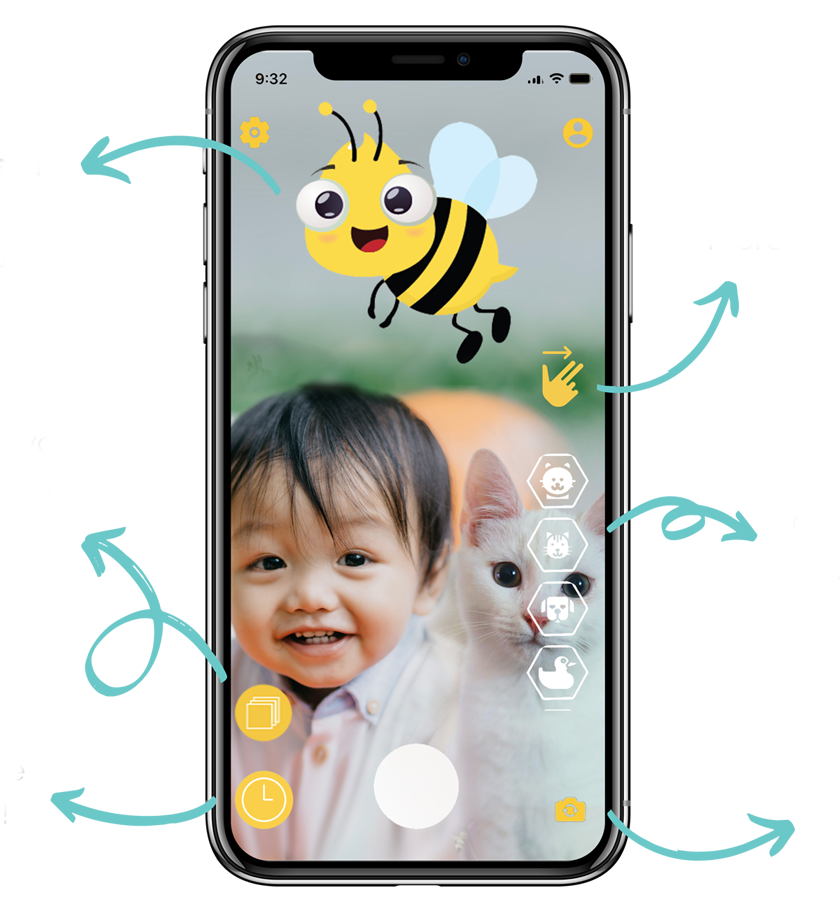
Swipe left to discover more engaging characters.
Our sound effect carousel makes a variery of attention grabbing noises.
Flip the camera view to take regular photos.
Who loves Selfi?
Selfi is the App for pets, animals, babies and young children. Take the perfect Selfi with your loved ones.

Try it out with your cat.

Dogs are attracted to the camera.